
Lab report scanner. Every result explained in plain language.
Point your phone at a blood test or any other lab report. MyCareTrack reads it test by test, shows each result next to the range printed on your report and keeps it with the rest of your health records.
Available on Google Play. The iPhone app is coming soon.
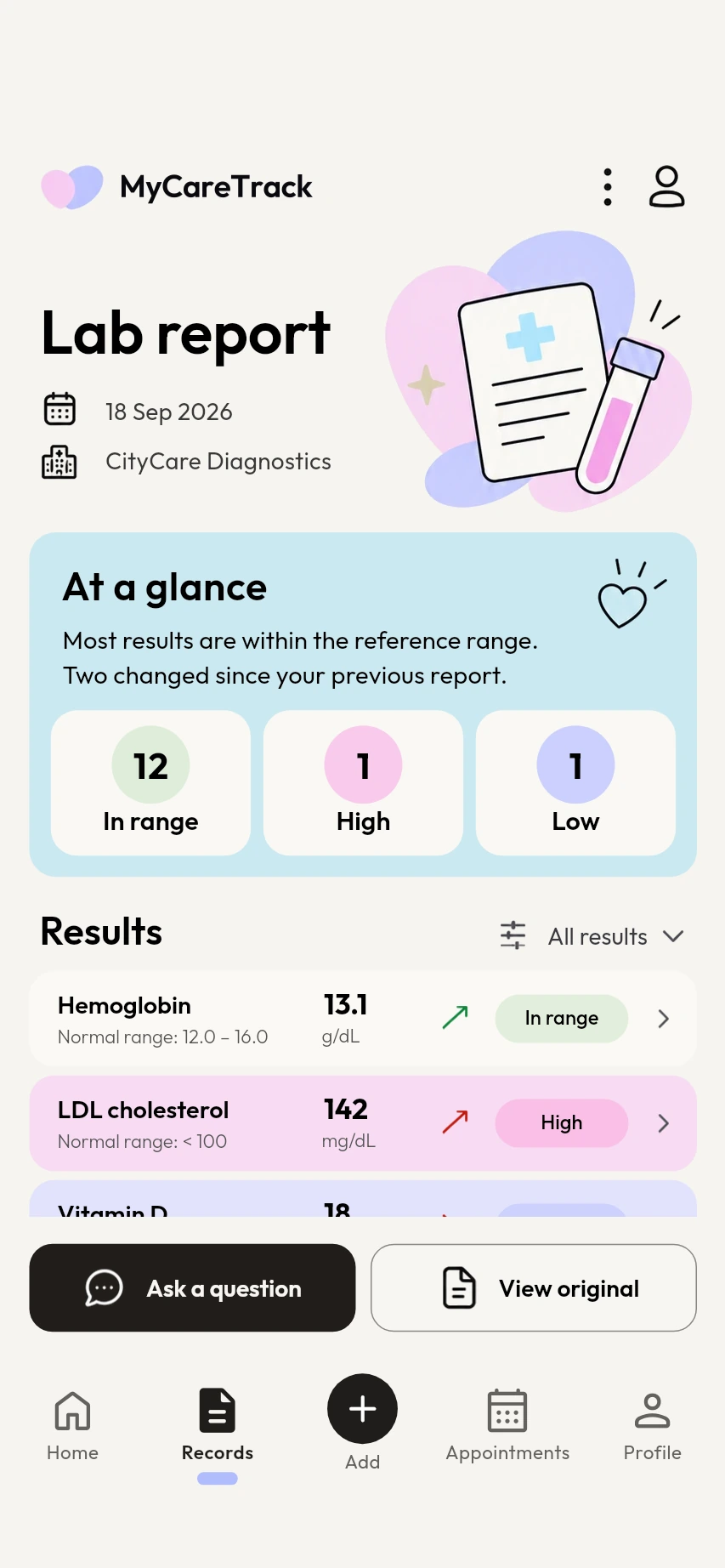
How the lab report scanner works
Scan the report
Open the Report Scanner and capture each page, choose photos from your gallery or upload a PDF.
Read each result
Every test is listed with your value and the range printed on the report, with the results above or below it marked.
Keep it and compare
The report joins your health timeline. Next time, compare two lab reports side by side to see what changed.
Why use MyCareTrack as a lab report scanner
Test by test
Each test gets a short note in everyday words, with notes for common tests such as cholesterol, HbA1c, hemoglobin and vitamin D.
Above, below or in range
Results are marked against the reference range printed on your own report, so you can see at a glance what to raise with your doctor.
Questions for your doctor
Every report comes with questions to take to your next visit, saved with the report.
Trends over time
Follow one result, such as LDL cholesterol or vitamin D, from report to report on a trend chart.
English, Hindi or Telugu
The app and its explanations follow the language you choose.
Frequently asked questions
How do I scan a lab report?
Open the Report Scanner in MyCareTrack, place the whole page inside the frame and capture each page. You can also choose photos from your gallery (JPG, PNG or HEIC) or upload a PDF.
Can MyCareTrack explain my blood test report?
Yes. It lists every test with your value and the range printed on the report, marks the results that are above or below it and adds a short plain-language note for common tests. It does not diagnose, so ask your doctor what the results mean for you.
Which lab reports can I scan?
Blood tests and other lab reports and test results, as photos or a PDF. Clear, complete pages are read more reliably than cropped or blurred ones.
Is my lab report private?
Only you can see your records in the app, and you can lock it with your fingerprint or face unlock. To read a report, the photo or PDF you add is sent to an AI service for processing. Nothing is shared unless you choose to share it.
Can I read the explanations in Hindi or Telugu?
Yes. Choose English, Hindi or Telugu and the app and its explanations follow your choice.
More from MyCareTrack
Get MyCareTrack on your phone.
MyCareTrack is available on Google Play, and the iPhone app is coming soon. Questions? The Help Center has answers, or email hello@lasyaaitech.com.